Last Updated: 29 October 2026
Quick Summary
A smart thermostat installation fault is usually caused by simple mistakes rather than a faulty unit. Check the batteries, wiring at each terminal, and Wi-Fi connection first before resetting or calling a Gas Safe engineer.
- Check batteries are fitted with the correct polarity, using fresh alkaline cells.
- Many smart thermostats need a C-wire; without one, the boiler may click on and off.
- Many smart thermostats only support 2.4 GHz networks, so check your router settings.
- Photograph the wiring before disconnecting anything, so you can restore it correctly.
- Stop and call a Gas Safe engineer if you smell gas or see burning or scorch marks.
Table of Contents
Most smart thermostat problems are not caused by a faulty unit. They usually come from a handful of predictable installation mistakes. A thermostat that will not power up, refuses to talk to the boiler, or drops off Wi-Fi usually has a simple cause that a careful check can find.
The good news is that many faults can be checked without specialist equipment. The trick is to work through them in a sensible order, starting with the basics and moving towards the more complicated checks.
Common causes include:
- Batteries fitted the wrong way round or left flat
- Wires loose at the terminals or connected to the wrong letter
- No power supply where the thermostat expects one
- A thermostat that does not suit the boiler or heating system
- Weak Wi-Fi signal or an app that was never set up properly
It is sensible to check the simple things first, before resetting the router or contacting the manufacturer.
Safety First: When to Stop and Call a Gas Safe Engineer
Some faults are safe to check yourself. Others are not. Anything involving the boiler, gas pipework, or the mains electrical supply should be left to a professional.
If you smell gas, turn off the gas supply at the meter, open windows, and call the National Gas Emergency Service on 0800 111 999 straight away. Do not touch switches or try to light appliances.
Stop and call a Gas Safe registered engineer if you notice:
- A burning smell or scorch marks near the boiler or thermostat
- Sparks or a warm, buzzing wall plate
- A boiler that shuts down with a fault code you do not recognise
- Any wiring work that requires you to open the boiler casing
Gas work in the UK must be carried out by someone on the Gas Safe Register. You can check an engineer’s registration on the official Gas Safe Register search tool. Major Heat engineers are Gas Safe registered.
Smart Thermostat Not Working After Installation: Power and Display Checks
A blank screen is the most common complaint. Start by confirming the thermostat has power, then check the batteries, then check the power supply it expects.
A thermostat with a blank display is often fed from batteries, a C-wire, or both. Work through the options in this order:
- Confirm the display lights when you press a button
- Check the batteries are fitted with the correct polarity
- Check the C-wire connection if your model uses one
- Look for a tripped fuse or switched-off spur on the boiler circuit
Dead or incorrectly fitted batteries
Remove the batteries and refit them, matching the + and – markings exactly. Use fresh alkaline cells rather than old stock. Many units show a low-battery warning well before they fail, so do not ignore it.
C-wire requirements and power sharing symptoms
Many smart thermostats need a common wire (C-wire) to run continuously. Without it, the unit may borrow a little power through the heating wires. This “power sharing” can cause the boiler to click on and off, or the screen to flicker. If you see these symptoms, the thermostat probably lacks a dedicated power feed. A Gas Safe engineer can advise whether your boiler supports a C-wire or whether a power adapter is the better fix.
Smart Thermostat Wiring Problems: A Terminal-by-Terminal Check
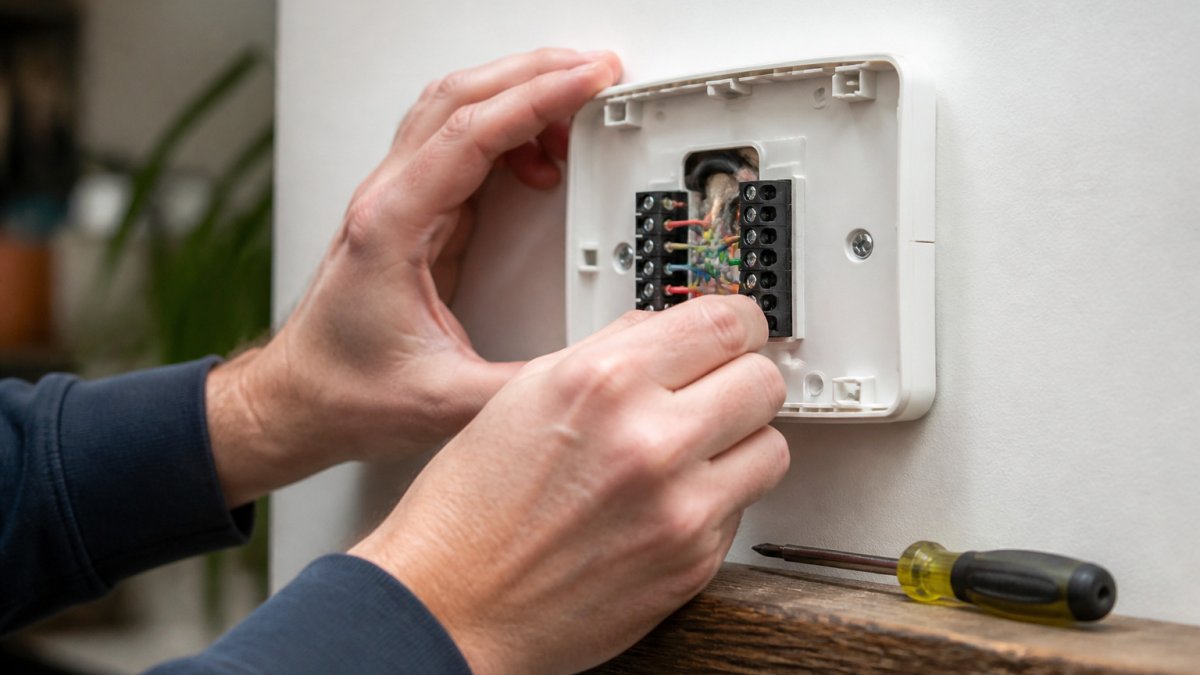
Wiring faults cause a large share of smart thermostat installation failures. Switch off the heating at the boiler and the mains before you remove the thermostat backplate.
Photograph the wiring before you disconnect anything. Then check each wire against its terminal:
- Compare each wire with the labels on the terminal block
- Make sure each wire is clamped firmly, with no bare copper showing outside the terminal
- Confirm the C wire goes to the C terminal, not to a heating terminal
- Check that no two wires touch each other behind the plate
- Re-seat the backplate so it sits flat against the wall
If wires look burnt, brittle, or discoloured, stop and call a Gas Safe engineer. Do not try to repair damaged cabling yourself.
Smart Thermostat Not Connecting to Wi-Fi: Network and App Fixes
Connection problems are usually about signal strength or setup, not the thermostat itself. Check the thermostat is within reliable range of your router, then confirm the password and network band.
- Many smart thermostats only support 2.4 GHz networks, so check your router settings
- Re-enter the Wi-Fi password carefully, as it is case-sensitive
- Restart the router and the thermostat
- Move the router closer, or use a Wi-Fi extender if the signal is weak
- Remove and re-add the device in the app if it still will not connect
Keep the app updated and check that your phone has permission to use local network features.
Smart Thermostat Not Turning Heating On: Communication and Compatibility
If the thermostat shows the right temperature but the heating does not come on, the problem is often communication or compatibility. The thermostat may not be sending the right signal to the boiler.
Check these points:
- The system mode is set to heat, not off or cool
- The schedule is not overriding your manual setting
- The thermostat is compatible with your boiler type
- The boiler is switched on and not showing a fault code
Some systems, particularly older or more complex setups, need a specific interface or adaptor. It is worth confirming compatibility with a Gas Safe engineer before buying a new unit.
Watch out: Do not rewire the boiler’s internal controls to force the heating on. This can cause unsafe operation and will usually void the boiler warranty.
Testing Your Installation and Booking Your Next Step
Once the fault appears fixed, test the system properly. Set the thermostat to a temperature a few degrees above the room temperature and confirm the boiler fires. Then check the temperature reading against a separate thermometer after an hour.
If the heating still does not respond, or the boiler shows a fault, book a visit from a Gas Safe engineer rather than continuing to experiment. Major Heat offers [book professional boiler servicing | page:5] across Kent. If your issue is a faulty or incompatible thermostat, you can find out more about [upgrading to a smart thermostat | page:1].
Frequently Asked Questions
Why is my smart thermostat not working after installation?
The most common causes are dead or incorrectly fitted batteries, a missing or poorly connected common (C) wire, loose terminal screws, or a thermostat that is not compatible with your boiler. Start by confirming the display has power, then check each wire sits firmly in the correct terminal. If the thermostat still shows no display or the boiler does not respond after these checks, stop and call a Gas Safe registered engineer, as the fault may be in the boiler’s electrical circuit rather than the thermostat itself.
Why is my smart thermostat not turning the heating on?
Check that the thermostat is actually calling for heat by looking for a heating indicator on the display and confirming the schedule and target temperature are set above the room temperature. Next, check the wiring at the heating terminals and confirm the boiler is switched on and not showing a fault code. If the thermostat calls for heat but the boiler does not fire, the problem usually lies in communication between the two, so a compatibility check or an engineer visit is the sensible next step.
Can a smart thermostat work without a common wire?
Many smart thermostats can run without a C-wire by drawing a small amount of power through the heating circuit, but this is not reliable with every boiler. Symptoms of insufficient power include a display that dims, resets or fails to hold a Wi-Fi connection, and heating that cuts out unexpectedly. Some models include a power adapter or accessory kit to solve this. Check your thermostat’s compatibility guide and your boiler’s wiring before deciding, and ask a Gas Safe engineer if you are unsure.
When should I call a heating engineer about a smart thermostat installation?
Call a Gas Safe registered engineer if you notice a burning smell, sparks, scorch marks on wiring, a boiler fault code that persists after a reset, or if the thermostat has no power after you have checked the batteries and connections. Work on the boiler’s gas and electrical systems should only be carried out by a Gas Safe registered engineer. Major Heat offers boiler repairs, servicing and emergency plumbing in Kent, and provides free quotes.
